
Documentation Index

Fetch the complete documentation index at: https://meta-preview.mintlify.io/llms.txt

Use this file to discover all available pages before exploring further.

This documentation provides guidance for integrating app events to the Conversions API.

Prerequisites

1. Dataset

App events sent through the Conversions API must be associated with a dataset. Datasets allow advertisers to connect and manage event data from web, app, store and business messaging event sources to the Conversions API. Datasets may show event data from any of these integrations that you choose to set up:
  • Meta Pixel (website events)
  • App Events API (app events, including Facebook SDK for iOS or Android, mobile measurement partners (MMPs))
  • Offline Conversions API (Meta’s legacy API for offline events)
  • Messaging Events API (messaging events)
Datasets enable you to view all customer activities from a single interface. They also allow you to reduce the effort to build and maintain multiple API integrations. In Events Manager, advertisers have different options to create a dataset depending on their starting point. Or you can create a brand new dataset in Events Manager by linking during offline event set creation or through an existing mobile app or during messaging event set creation information. Note that linking a dataset to an application is required before sending mobile app events to the Conversions API and only one application can be linked to a dataset. See more details and instructions here. You can make the GET call to https://graph.facebook.com/v16.0/{ads-pixel-id}/is_consolidated_container to detect if the advertiser’s dataset is consolidated and thus eligible for passing app events via the Conversions API.

2. Permissions

  • To implement a direct integration as an advertiser, please follow the instructions here for prerequisites and permissions.
  • To implement a partner platform integration, please follow the instructions here for prerequisites and permissions.

Configuration

Sending App Events to the Conversions API

a. Linking dataset ID and app ID In Events Manager, there are two ways to link your app with a dataset:
  • Select the “Data Sources” tab, find your app’s “Setting” tab and perform the linking.
  • Select the “Data Sources” tab, in the “Overview” tab of your app, use the “Link to dataset” button in the “All Activity” section.
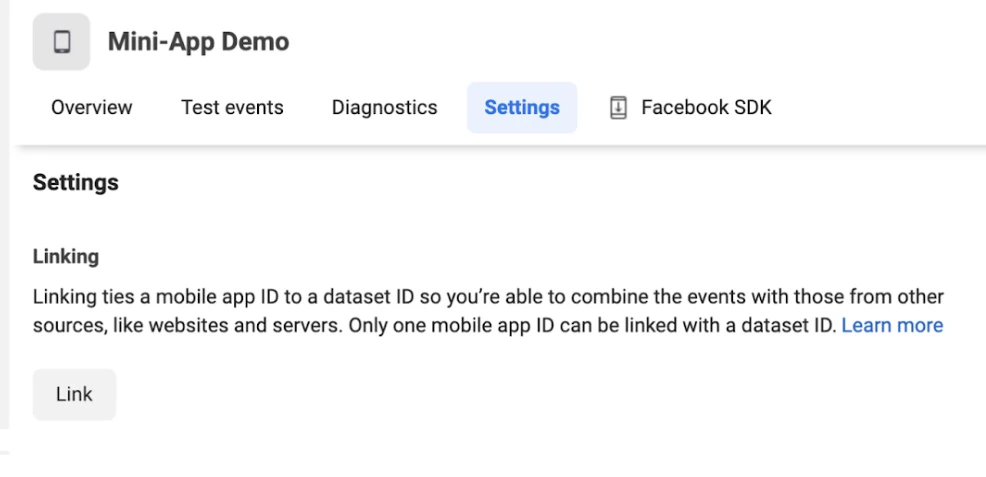
Once you complete the linking, the dataset includes the connected app.
b. Required fields You can refer here to the current set of parameters that can be sent over the Conversions API. For sending app events, the following server_event fields can be shared in the payload:

App Data Fields

ParameterDescription
advertiser_tracking_enabled (boolean)Required for app events - Use this field to specify ATT permission on an iOS 14.5+ device. Set to 0 for disabled or 1 for enabled.
application_tracking_enabled (boolean)Required for app events - A person can choose to enable ad tracking on an app level. Your SDK should allow an app developer to include an opt-out setting in their app. Use 0 for disabled, 1 for enabled.
extinfo (object)Required for app events - Extended device information, such as screen width and height. This parameter is an array, and values are separated by commas. All values are required and must be in the order indexed below. If a value is missing, use an empty string as a placeholder.

Note:
- version must be a2 for Android
- version must be i2 for iOS
0 (string)Required - extinfo version. Example: i2
1 (string)App package name. Example: com.facebook.sdk.samples.hellofacebook
2 (string)Short version (int or string). Example: 1.0
3 (string)Long version. Example: 1.0 long
4 (string)Required - OS version. Example: 13.4.1
5 (string)Device model name. Example: iPhone5,1
6 (string)Locale. Example: en_US
7 (string)Timezone abbreviation. Example: PDT
8 (string)Carrier. Example: AT&T
9 (string)Screen width. Example: 320
10 (string)Screen height. Example: 568
11 (string)Screen density. Example: 2
12 (string)CPU cores. Example: 2
13 (string)External storage size in GB. Example: 13
14 (string)Free space on external storage in GB. Example: 8
15 (string)Device timezone. Example: USA/New York
campaign_ids (string)Optional - An encrypted string and non-user metadata appended to the outbound URL (e.g., ad_destination_url) or deep link (for App Aggregated Event Manager) when a user clicked on a link from Facebook. Graph API definition: Parameter passed via the deep link for Mobile App Engagement campaigns.
install_referrer (string)Optional - Third-party install referrer, currently available for Android only. See more details.
installer_package (string)Optional - Used internally by the Android SDKs.
url_schemes (array)Optional - Used internally by the iOS and Android SDKs.
vendor_id (string)Optional - Vendor ID.
windows_attribution_id (string)Optional - Attribution token used for Windows 10.

Customer Information Parameters

ParameterDescription
anon_id (string)Do not hash. Your install ID. This field represents unique application installation instances.
client_ip_address (string)Do not hash. The IP address of the browser corresponding to the event must be a valid IPv4 or IPv6 address. IPv6 is preferable over IPv4 for IPv6-enabled users.

The client_ip_address parameter must never be hashed. No spaces should be included. Always provide the real IP address to ensure accurate event reporting.

Note: This information is automatically added to events sent through the browser but must be manually configured for events sent through the server.

Example:
- IPv4: 168.212.226.204
- IPv6: 2001:0db8:85a3:0000:0000:8a2e:0370:7334
madid (string)Do not hash. Your mobile advertiser ID, which refers to the Advertising ID from an Android device or the Advertising Identifier (IDFA) from an Apple device.

Custom Data

ParameterDescription
description (string)Optional. Custom event description as a string.
level (string)Optional. Custom level of a game as a string.
max_rating_value (long)Optional. Upper bound of a rating scale (e.g., 5 on a 5-star scale), custom.
success (boolean)Optional. Custom success flag: 1 for yes, 0 for no.
In summary, the app events shared using the Conversions API will require the following data parameters: Below is an example of extinfo. Make sure all the sub parameters below are filled and in sequential order. If anything is missing, use an empty string as a placeholder.
Subparameter NameRequiredData TypeExample
extinfo versionYesstringi2 (version must be a2 for Android, must be i2 for iOS)
app package nameNostringcom.facebook.sdk.samples.hellofacebook
short versionNostring1.0
long versionNostring1.0 long
os versionYesstring13.4.1
device model nameNostringiPhone5,1
localeNostringEn_US
timezone abbrNostringPDT
carrierNostringAT&T
screen widthNostring320
screen heightNostring568
screen densityNostring2
cpu coreNostring2
external storage sizeNostring13
free space in external storage sizeNostring8
device time zoneNostringUSA/New York
c. Set Up Deduplication for Multiple Channels The deduplication mechanism will be required to remove duplicate event traffic between the Conversions API integration and all other existing integrations you have with app events including SDK, MMPs and App Events API. For app events, we apply the same deduplication functionality that exists for web events. The logic leverages the field event_id and event_name based deduplication (Conversions API and SDK / App Events API events that carry the same event_id). The event_id parameter is an identifier that can uniquely distinguish between similar events. Inaccurate event IDs may cause your conversion to be wrongly deduplicated, further impacting conversion reporting and campaign performance. You can refer to the following developer documentation to implement the deduplication setup: Here is an example of how to log a custom event. To do so, pass the name of the event as an AppEvents.Name in iOS SDK:
AppEvents.shared.logEvent(.achievedLevel, parameters: [AppEvents.ParameterName(rawValue: "event_id"): "123"])
For app install events, there is already a deduplication mechanism that makes sure only one install is attributed in the last 90-day window. We keep the first event and drop the later ones no matter the action source they are from. There is no requirement for implementing deduplication for app events related to install events. d. Sending Events To send new events, make a POST request to Conversions API from this path: https://graph.facebook.com/{API_VERSION}/{DATASET_ID}/events?access_token={TOKEN}. When you post to this edge, Meta creates new app server events. For more details, please refer to the following developer document. Here is an overview of how the parameters fit into the overall schema in the payload:
{
    "data": [
        {
            "event_name": "Purchase",
            "event_time": 1684389752,
            "action_source": "app",
            "user_data": {
                "em": [
                    "30a79640dfd8293d4f4965ec11821f640ca77979ca0a6b365f06372f81a3f602"
                ],
                "ph": [
                    "74234e98afe7498fb5daf1f36ac2d78acc339464f950703b8c019892f982b90b",
                    "74234e98afe7498fb5daf1f36ac2d78acc339464f950703b8c019892f982b90b"
                ],
                "madid": "bbbbbbbbbbbb",
      "anon_id": "cccccccc"
            },
            "custom_data": {
                "currency": "USD",
                "value": "142.52"
            },
            "app_data": {
                "advertiser_tracking_enabled": "True",
                "application_tracking_enabled": "True",
                "campaign_ids": "aaaaaaaaa",
                "extinfo": [
                    "a2",
                    "com.some.app",
                    "771",
                    "Version 7.7.1",
                    "10.1.1",
                    "OnePlus6",
                    "en_US",
                    "GMT-1",
                    "TMobile",
                    "1920",
                    "1080",
                    "2.00",
                    "2",
                    "128",
                    "8",
                    "USA/New York"
                ]
            }
        }
    ]
}

Troubleshooting

You can use the Payload Helper tool to generate payload data:
  • Choose app action source when applicable
  • Fill info for the events that will be sent to Meta
  • This will generate event payload, which can be used as a template for your Conversions API integration
Use the Test Events tool in Events Manager for testing.