> ## Documentation Index
> Fetch the complete documentation index at: https://meta-preview.mintlify.site/llms.txt
> Use this file to discover all available pages before exploring further.
# Using the Conversions API
> Learn how to use the Conversions API to send events to Meta.
The Conversions API is based on Facebook's [Marketing API](/docs/marketing-apis), which was built on top of our [Graph API](/docs/graph-api). Marketing and Graph APIs have different version deprecation schedules. Our release cycle is aligned with the [Graph API](/docs/graph-api/changelog), so every version is supported for at least two years. This exception is only valid for the Conversions API.
Web, app, and physical store events shared using the Conversions API require specific parameters. By using the Conversions API, you agree that the [`action_source`](/docs/marketing-api/conversions-api/parameters/server-event#action-source) parameter is accurate to the best of your knowledge. The list of [required parameters is available here](/docs/marketing-api/conversions-api/parameters).
## Send Requests
To send new events, make a `POST` request to this API's `/events` edge from this path: `https://graph.facebook.com/{API_VERSION}/{PIXEL_ID}/events?access_token={TOKEN}`. When you post to this edge, Facebook creates new server events.
cURLNode.js SDKPHP SDKPython SDKJava SDKRuby SDK
```curl cURL theme={null}
curl -X POST \
-F 'data=[
{
"event_name": "Purchase",
"event_time": 1740106138,
"user_data": {
"em": [
"309a0a5c3e211326ae75ca18196d301a9bdbd1a882a4d2569511033da23f0abd"
],
"ph": [
"254aa248acb47dd654ca3ea53f48c2c26d641d23d7e2e93a1ec56258df7674c4",
"6f4fcb9deaeadc8f9746ae76d97ce1239e98b404efe5da3ee0b7149740f89ad6"
],
"client_ip_address": "123.123.123.123",
"client_user_agent": "$CLIENT_USER_AGENT",
"fbc": "fb.1.1554763741205.AbCdEfGhIjKlMnOpQrStUvWxYz1234567890",
"fbp": "fb.1.1558571054389.1098115397"
},
"custom_data": {
"currency": "usd",
"value": 123.45,
"contents": [
{
"id": "product123",
"quantity": 1,
"delivery_category": "home_delivery"
}
]
},
"event_source_url": "http://jaspers-market.com/product/123",
"action_source": "website"
}
]' \
-F 'access_token=' \
https://graph.facebook.com/v22.0//events
```
[Open In Graph API Explorer](https://developers.facebook.com/tools/explorer/?method=POST\&path=%3CPIXEL_ID%3E%2Fevents?\&version=v22.0\&data=%5B%7B%22event_name%22%3A%22Purchase%22%2C%22event_time%22%3A1740106138%2C%22user_data%22%3A%7B%22em%22%3A%5B%22309a0a5c3e211326ae75ca18196d301a9bdbd1a882a4d2569511033da23f0abd%22%5D%2C%22ph%22%3A%5B%22254aa248acb47dd654ca3ea53f48c2c26d641d23d7e2e93a1ec56258df7674c4%22%2C%226f4fcb9deaeadc8f9746ae76d97ce1239e98b404efe5da3ee0b7149740f89ad6%22%5D%2C%22client_ip_address%22%3A%22123.123.123.123%22%2C%22client_user_agent%22%3A%22%24CLIENT_USER_AGENT%22%2C%22fbc%22%3A%22fb.1.1554763741205.AbCdEfGhIjKlMnOpQrStUvWxYz1234567890%22%2C%22fbp%22%3A%22fb.1.1558571054389.1098115397%22%7D%2C%22custom_data%22%3A%7B%22currency%22%3A%22usd%22%2C%22value%22%3A123.45%2C%22contents%22%3A%5B%7B%22id%22%3A%22product123%22%2C%22quantity%22%3A1%2C%22delivery_category%22%3A%22home_delivery%22%7D%5D%7D%2C%22event_source_url%22%3A%22http%3A%5C%2F%5C%2Fjaspers-market.com%5C%2Fproduct%5C%2F123%22%2C%22action_source%22%3A%22website%22%7D%5D)
```js Node.js SDK theme={null}
'use strict';
const bizSdk = require('facebook-nodejs-business-sdk');
const Content = bizSdk.Content;
const CustomData = bizSdk.CustomData;
const DeliveryCategory = bizSdk.DeliveryCategory;
const EventRequest = bizSdk.EventRequest;
const UserData = bizSdk.UserData;
const ServerEvent = bizSdk.ServerEvent;
const access_token = '';
const pixel_id = '';
const api = bizSdk.FacebookAdsApi.init(access_token);
let current_timestamp = Math.floor(new Date() / 1000);
const userData = (new UserData())
.setEmails(['joe@eg.com'])
.setPhones(['12345678901', '14251234567'])
// It is recommended to send Client IP and User Agent for Conversions API Events.
.setClientIpAddress(request.connection.remoteAddress)
.setClientUserAgent(request.headers['user-agent'])
.setFbp('fb.1.1558571054389.1098115397')
.setFbc('fb.1.1554763741205.AbCdEfGhIjKlMnOpQrStUvWxYz1234567890');
const content = (new Content())
.setId('product123')
.setQuantity(1)
.setDeliveryCategory(DeliveryCategory.HOME_DELIVERY);
const customData = (new CustomData())
.setContents([content])
.setCurrency('usd')
.setValue(123.45);
const serverEvent = (new ServerEvent())
.setEventName('Purchase')
.setEventTime(current_timestamp)
.setUserData(userData)
.setCustomData(customData)
.setEventSourceUrl('http://jaspers-market.com/product/123')
.setActionSource('website');
const eventsData = [serverEvent];
const eventRequest = (new EventRequest(access_token, pixel_id))
.setEvents(eventsData);
eventRequest.execute().then(
response => {
console.log('Response: ', response);
},
err => {
console.error('Error: ', err);
}
);
```
```php PHP SDK theme={null}
require __DIR__ . '/vendor/autoload.php';
use FacebookAds\Api;
use FacebookAds\Logger\CurlLogger;
use FacebookAds\Object\ServerSide\ActionSource;
use FacebookAds\Object\ServerSide\Content;
use FacebookAds\Object\ServerSide\CustomData;
use FacebookAds\Object\ServerSide\DeliveryCategory;
use FacebookAds\Object\ServerSide\Event;
use FacebookAds\Object\ServerSide\EventRequest;
use FacebookAds\Object\ServerSide\UserData;
$access_token = '';
$pixel_id = '';
$api = Api::init(null, null, $access_token);
$api->setLogger(new CurlLogger());
$user_data = (new UserData())
->setEmails(array('joe@eg.com'))
->setPhones(array('12345678901', '14251234567'))
// It is recommended to send Client IP and User Agent for Conversions API Events.
->setClientIpAddress($_SERVER['REMOTE_ADDR'])
->setClientUserAgent($_SERVER['HTTP_USER_AGENT'])
->setFbc('fb.1.1554763741205.AbCdEfGhIjKlMnOpQrStUvWxYz1234567890')
->setFbp('fb.1.1558571054389.1098115397');
$content = (new Content())
->setProductId('product123')
->setQuantity(1)
->setDeliveryCategory(DeliveryCategory::HOME_DELIVERY);
$custom_data = (new CustomData())
->setContents(array($content))
->setCurrency('usd')
->setValue(123.45);
$event = (new Event())
->setEventName('Purchase')
->setEventTime(time())
->setEventSourceUrl('http://jaspers-market.com/product/123')
->setUserData($user_data)
->setCustomData($custom_data)
->setActionSource(ActionSource::WEBSITE);
$events = array();
array_push($events, $event);
$request = (new EventRequest($pixel_id))
->setEvents($events);
$response = $request->execute();
print_r($response);
```
```py Python SDK theme={null}
import time
from facebook_business.adobjects.serverside.action_source import ActionSource
from facebook_business.adobjects.serverside.content import Content
from facebook_business.adobjects.serverside.custom_data import CustomData
from facebook_business.adobjects.serverside.delivery_category import DeliveryCategory
from facebook_business.adobjects.serverside.event import Event
from facebook_business.adobjects.serverside.event_request import EventRequest
from facebook_business.adobjects.serverside.user_data import UserData
from facebook_business.api import FacebookAdsApi
access_token = ''
pixel_id = 'ADS_PIXEL_ID>'
FacebookAdsApi.init(access_token=access_token)
user_data = UserData(
emails=['joe@eg.com'],
phones=['12345678901', '14251234567'],
# It is recommended to send Client IP and User Agent for Conversions API Events.
client_ip_address=request.META.get('REMOTE_ADDR'),
client_user_agent=request.headers['User-Agent'],
fbc='fb.1.1554763741205.AbCdEfGhIjKlMnOpQrStUvWxYz1234567890',
fbp='fb.1.1558571054389.1098115397',
)
content = Content(
product_id='product123',
quantity=1,
delivery_category=DeliveryCategory.HOME_DELIVERY,
)
custom_data = CustomData(
contents=[content],
currency='usd',
value=123.45,
)
event = Event(
event_name='Purchase',
event_time=int(time.time()),
user_data=user_data,
custom_data=custom_data,
event_source_url='http://jaspers-market.com/product/123',
action_source=ActionSource.WEBSITE,
)
events = [event]
event_request = EventRequest(
events=events,
pixel_id=pixel_id,
)
event_response = event_request.execute()
print(event_response)
```
```java Java SDK theme={null}
import com.facebook.ads.sdk.APIContext;
import com.facebook.ads.sdk.APIException;
import com.facebook.ads.sdk.serverside.ActionSource;
import com.facebook.ads.sdk.serverside.Content;
import com.facebook.ads.sdk.serverside.CustomData;
import com.facebook.ads.sdk.serverside.DeliveryCategory;
import com.facebook.ads.sdk.serverside.Event;
import com.facebook.ads.sdk.serverside.EventRequest;
import com.facebook.ads.sdk.serverside.EventResponse;
import com.facebook.ads.sdk.serverside.UserData;
import java.util.Arrays;
public class ServerSideApiExample {
public static final String ACCESS_TOKEN = "";
public static final String PIXEL_ID = "";
public static void main(String[] args) {
APIContext context = new APIContext(ACCESS_TOKEN).enableDebug(true);
context.setLogger(System.out);
UserData userData = new UserData()
.emails(Arrays.asList("joe@eg.com"))
.phones(Arrays.asList("12345678901", "14251234567"))
// It is recommended to send Client IP and User Agent for Conversions API Events.
.clientIpAddress(clientIpAddress)
.clientUserAgent(clientUserAgent)
.fbc("fb.1.1554763741205.AbCdEfGhIjKlMnOpQrStUvWxYz1234567890")
.fbp("fb.1.1558571054389.1098115397");
Content content = new Content()
.productId("product123")
.quantity(1L)
.deliveryCategory(DeliveryCategory.home_delivery);
CustomData customData = new CustomData()
.addContent(content)
.currency("usd")
.value(123.45F);
Event purchaseEvent = new Event();
purchaseEvent.eventName("Purchase")
.eventTime(System.currentTimeMillis() / 1000L)
.userData(userData)
.customData(customData)
.eventSourceUrl("http://jaspers-market.com/product/123")
.actionSource(ActionSource.website);
EventRequest eventRequest = new EventRequest(PIXEL_ID, context);
eventRequest.addDataItem(purchaseEvent);
try {
EventResponse response = eventRequest.execute();
System.out.println(String.format("Standard API response : %s ", response));
} catch (APIException e) {
e.printStackTrace();
}
}
}
```
```ruby Ruby SDK theme={null}
require 'facebook_ads'
access_token = ''
pixel_id = ''
FacebookAds.configure do |config|
config.access_token = access_token
end
user_data = FacebookAds::ServerSide::UserData.new(
emails: ['joe@eg.com'],
phones: ['12345678901', '14251234567'],
# It is recommended to send Client IP and User Agent for Conversions API Events.
client_ip_address: request.remote_ip,
client_user_agent: request.user_agent,
fbc: 'fb.1.1554763741205.AbCdEfGhIjKlMnOpQrStUvWxYz1234567890',
fbp: 'fb.1.1558571054389.1098115397'
)
content = FacebookAds::ServerSide::Content.new(
product_id: 'product123',
quantity: 1,
delivery_category: 'home_delivery'
)
custom_data = FacebookAds::ServerSide::CustomData.new(
contents: [content],
currency: 'usd',
value: 123.45
)
event = FacebookAds::ServerSide::Event.new(
event_name: 'Purchase',
event_time: Time.now.to_i,
user_data: user_data,
custom_data: custom_data,
event_source_url: 'http://jaspers-market.com/product/123',
action_source: 'website'
)
request = FacebookAds::ServerSide::EventRequest.new(
pixel_id: pixel_id,
events: [event]
)
print request.execute
```
Attach your generated secure access token using the `access_token` query parameter to the request. You can also use [Graph API Explorer](https://developers.facebook.com/tools/explorer/?method=POST\&path=%7BPIXEL_ID%7D%2Fevents%2F\&version=v3.2) to `POST` to the `//events` endpoint.
An example request body looks like this:
```json theme={null}
{
"data": [
{
"event_name": "Purchase",
"event_time": 1633552688,
"event_id": "event.id.123",
"event_source_url": "http:\/\/jaspers-market.com\/product\/123",
"action_source": "website",
"user_data": {
"client_ip_address": "192.19.9.9",
"client_user_agent": "test ua",
"em": [
"309a0a5c3e211326ae75ca18196d301a9bdbd1a882a4d2569511033da23f0abd"
],
"ph": [
"254aa248acb47dd654ca3ea53f48c2c26d641d23d7e2e93a1ec56258df7674c4",
"6f4fcb9deaeadc8f9746ae76d97ce1239e98b404efe5da3ee0b7149740f89ad6"
],
"fbc": "fb.1.1554763741205.AbCdEfGhIjKlMnOpQrStUvWxYz1234567890",
"fbp": "fb.1.1558571054389.1098115397"
},
"custom_data": {
"value": 100.2,
"currency": "USD",
"content_ids": [
"product.id.123"
],
"content_type": "product"
},
"opt_out": false
},
{
"event_name": "Purchase",
"event_time": 1633552688,
"user_data": {
"client_ip_address": "192.88.9.9",
"client_user_agent": "test ua2"
},
"custom_data": {
"value": 50.5,
"currency": "USD"
},
"opt_out": false
}
]
}
```
### Upload Time versus Event Transaction Time
`event_time` is the event transaction time. It should be sent as a Unix timestamp in seconds indicating when the actual event occurred. The specified time **may be earlier than the time you send the event to Facebook**. This is to enable batch processing and server performance optimization.
The `event_time` can be up to 7 days before you send an event to Meta. If any `event_time` in `data` is greater than 7 days in the past, we return an error for the entire request and process no events. For offline and physical store events with `physical_store` as `action_source`, you should upload transactions within 62 days of the conversion.
By using the Conversions API, you agree that the [`action_source`](/docs/marketing-api/conversions-api/parameters/server-event#action-source) parameter is accurate to the best of your knowledge.
### Batch Requests
You can send up to 1,000 events in `data`. However, for optimal performance, we recommend you send events as soon as they occur and ideally within an hour of the event occurring. **If any event you send in a batch is invalid, we reject the entire batch.**
### Hashing
Please check our [customer information parameters](/docs/marketing-api/server-side-api/parameters/user-data) page to see which parameters should be hashed before they are sent to Facebook. If you are using one of our [Business SDKs](/docs/business-sdk/), the hashing is done for you by the SDK.
### Business SDK Features for Conversions API
Learn more about three specific Business SDK features designed especially for Conversions API users: [Asynchronous Requests](/docs/marketing-api/conversions-api/guides/business-sdk-features#asynchronous-requests), [Concurrent Batching](/docs/marketing-api/conversions-api/guides/business-sdk-features#concurrent-batching), and [HTTP Service Interface](/docs/marketing-api/conversions-api/guides/business-sdk-features#http-service-interface). Minimum language version required to use these features:
* PHP >= 7.2
* Node.js >= 7.6.0
* Java >= 8
* Python >= 2.7
* Ruby >= 2
Business SDK support for PHP 5 has been deprecated since January 2019. Please upgrade to PHP 7 to use the Business SDK.
If you must use PHP 5, consider using our Swagger implementation.
## Verify Events
After you send your events, confirm that we have received them in [Events Manager](https://www.facebook.com/events_manager2/list):
* On the **Data Sources** page, click on the Pixel corresponding to the `PIXEL_ID` in your `POST` request. For more information see [Business Help Center: Navigate Events Manager](https://www.facebook.com/business/help/898185560232180).
* Then, click **Overview**. You see the number of raw, matched and attributed events we received. Under **Connection Method**, you see the channel in which that event was sent.
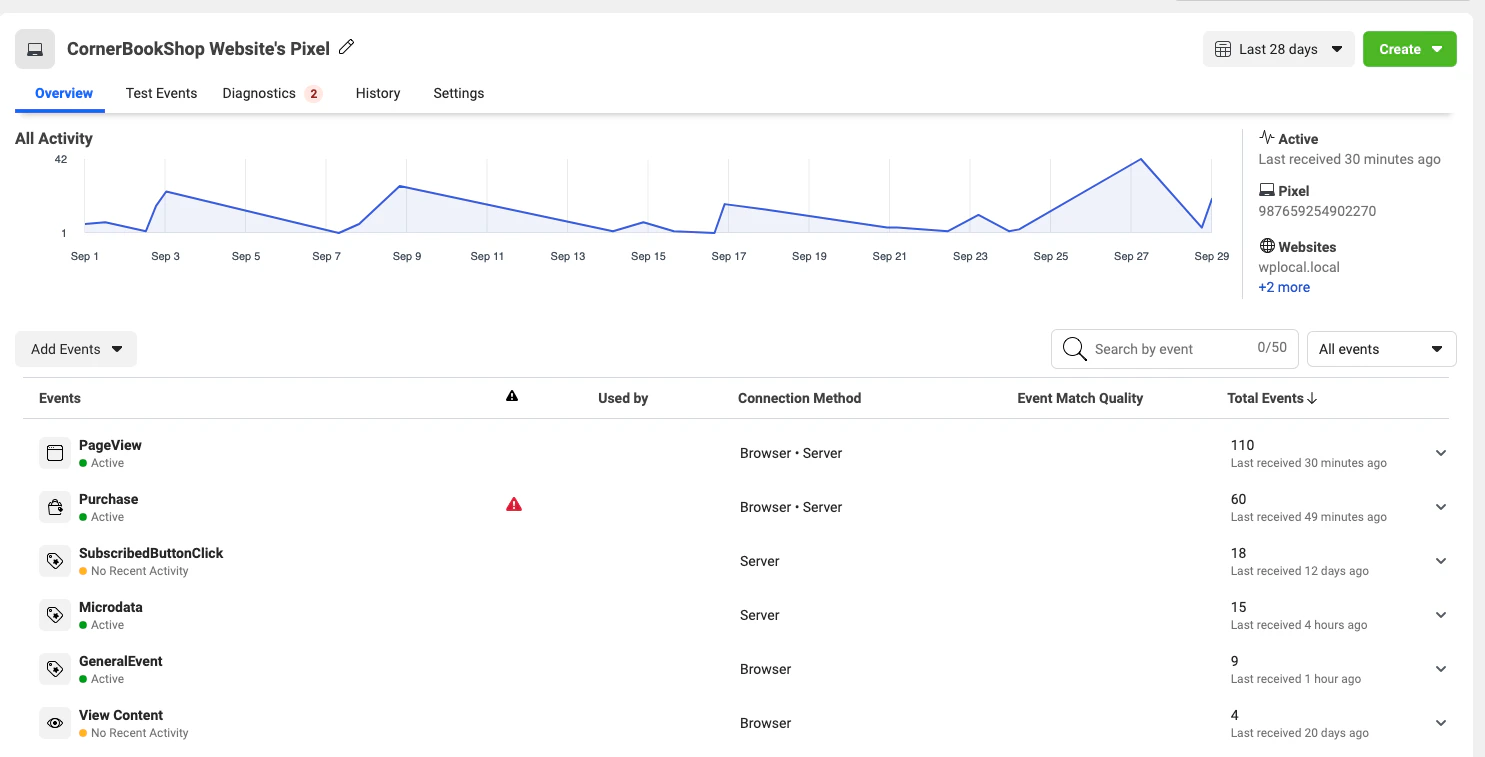 * You can click on each event to get more specific information.
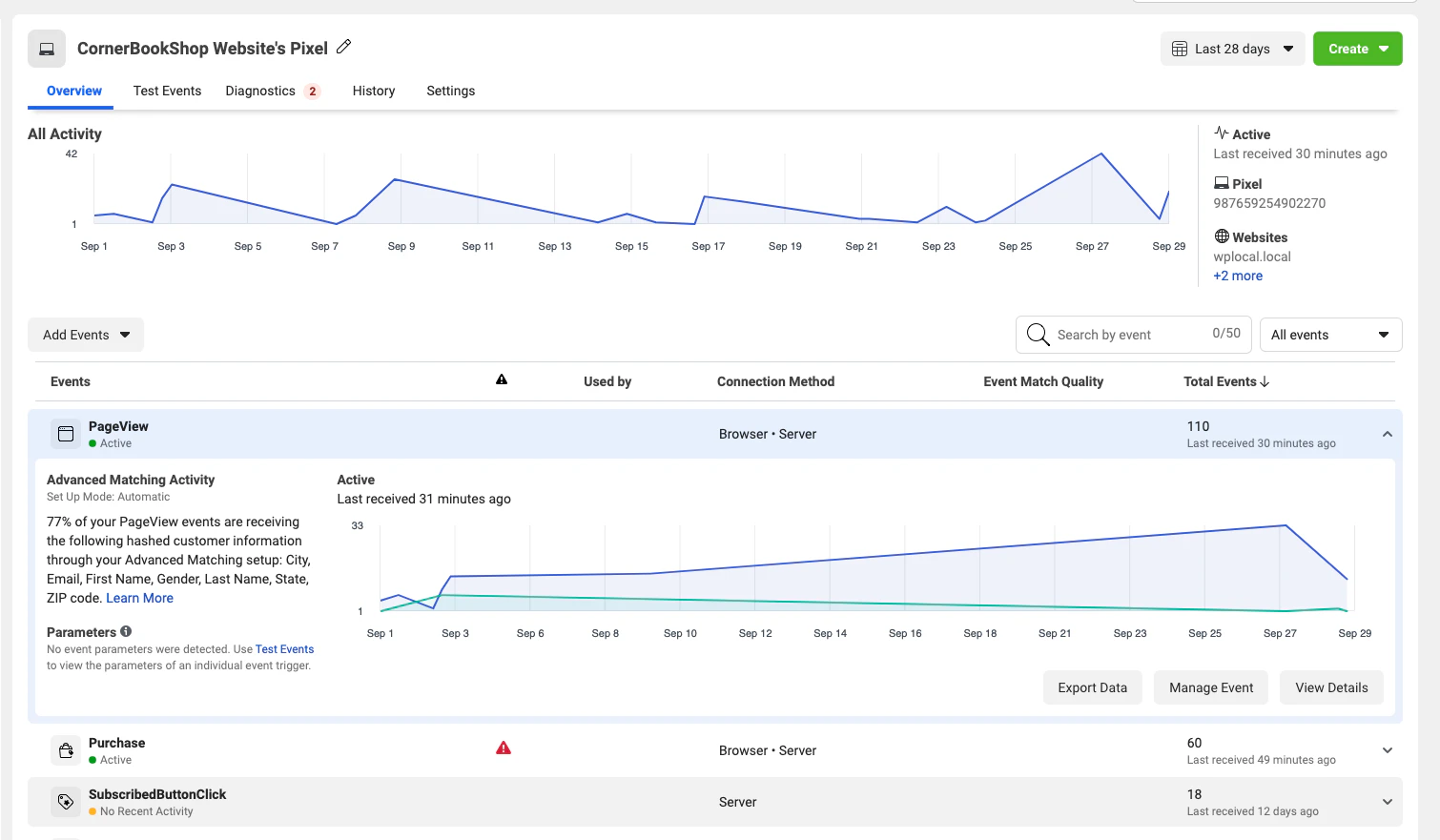 * After you start sending events, you should be able to verify them within 20 minutes. Now you can start sending events from your server.
## Test Events Tool
You can verify that your server events are received correctly by Facebook by using the Test Events feature in Events Manager. To find the tool, go to `Events Manager > Data Sources > Your Pixel > Test Events`.
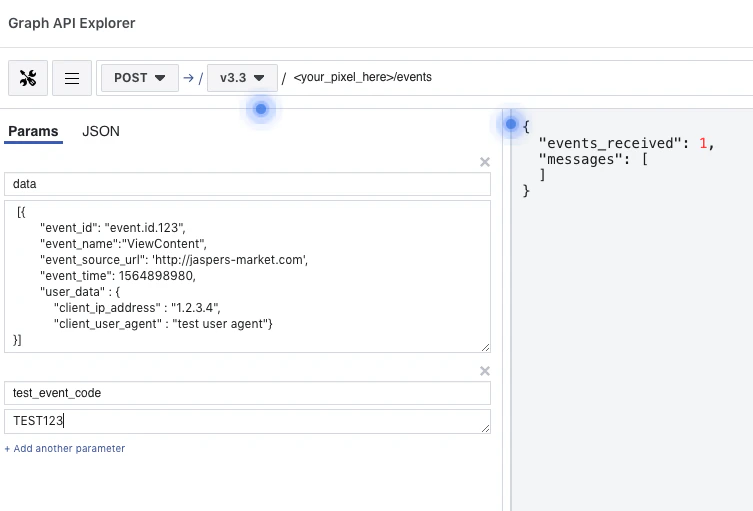
The Test Events tool generates a test ID. Send the test ID as a `test_event_code` parameter to start seeing event activity appear in the Test Events window.
**Note**: The `test_event_code` field should be used only for testing. You need to remove it when sending your production payload.
Events sent with `test_event_code` are not dropped. They flow into Events Manager and are used for targeting and ads measurement purposes.
Here's an example of how the request should be structured:
```json theme={null}
{
"data": [
{
"event_name": "ViewContent",
"event_time": 1740105538,
"event_id": "event.id.123",
"event_source_url": "http:\/\/jaspers-market.com",
"user_data": {
"client_ip_address": "1.2.3.4",
"client_user_agent": "test user agent"
}
}
],
"test_event_code": "TEST123"
}
```
Here's an example of how the request appears in Graph API Explorer:
You can generate this test payload using the [**Payload Helper tool**](/docs/marketing-api/conversions-api/payload-helper). Please note that the test event code is only for testing payload.
* After you start sending events, you should be able to verify them within 20 minutes. Now you can start sending events from your server.
## Test Events Tool
You can verify that your server events are received correctly by Facebook by using the Test Events feature in Events Manager. To find the tool, go to `Events Manager > Data Sources > Your Pixel > Test Events`.
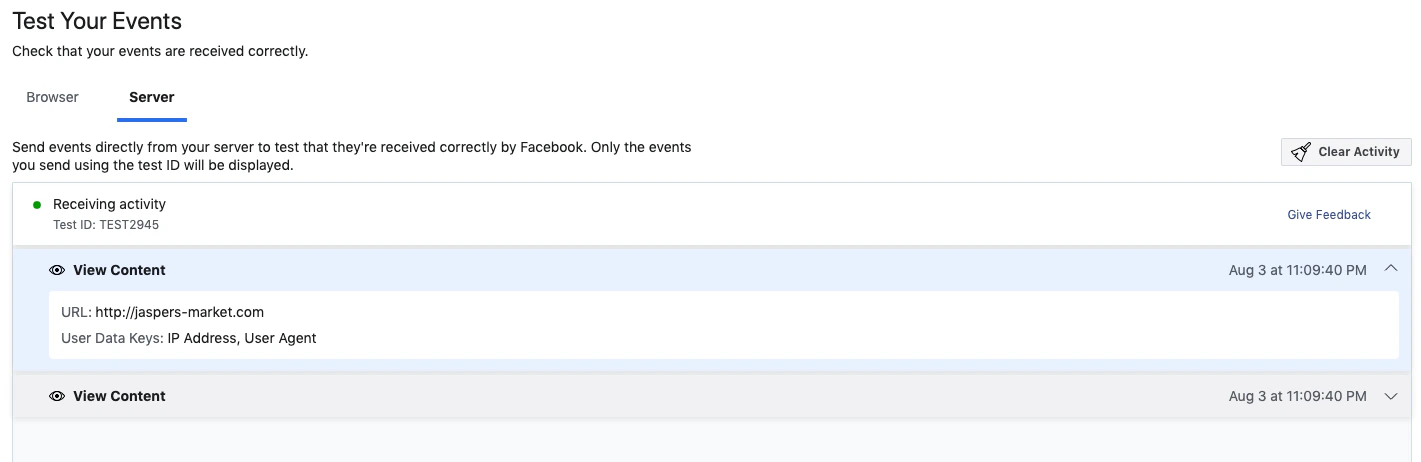
The Test Events tool generates a test ID. Send the test ID as a `test_event_code` parameter to start seeing event activity appear in the Test Events window.
**Note**: The `test_event_code` field should be used only for testing. You need to remove it when sending your production payload.
Events sent with `test_event_code` are not dropped. They flow into Events Manager and are used for targeting and ads measurement purposes.
Here's an example of how the request should be structured:
```json theme={null}
{
"data": [
{
"event_name": "ViewContent",
"event_time": 1740105538,
"event_id": "event.id.123",
"event_source_url": "http:\/\/jaspers-market.com",
"user_data": {
"client_ip_address": "1.2.3.4",
"client_user_agent": "test user agent"
}
}
],
"test_event_code": "TEST123"
}
```
Here's an example of how the request appears in Graph API Explorer:
You can generate this test payload using the [**Payload Helper tool**](/docs/marketing-api/conversions-api/payload-helper). Please note that the test event code is only for testing payload.
 Your server events appear in the Test Events window once the request is sent.
 ## [Data Processing Options](/docs/marketing-apis/data-processing-options) for US Users
For these two APIs, implement data processing options by adding `data_processing_options`, `data_processing_options_country`, and `data_processing_options_state` inside each event within the [data parameter](/docs/marketing-api/server-side-api/parameters/main-body#data) of your events.
**Note:** The App Events and Offline Conversions APIs are no longer recommended for new integrations. Instead, it is recommended that you use the Conversions API as it now supports web, app, and offline events. See [Conversions API for App Events](/docs/marketing-api/conversions-api/app-events) and [Conversions API for Offline Events](/docs/marketing-api/conversions-api/offline-events) for more information.
To explicitly not enable Limited Data Use (LDU), specify an empty array for each event or simply remove the field in the payload:
```json theme={null}
{
"data": [
{
"event_name": "Purchase",
"event_time": ,
"user_data": {
"em": ""
},
"custom_data": {
"currency": "",
"value": ""
},
"data_processing_options": []
}
]
}
```
To enable LDU and have Meta perform geolocation:
```json theme={null}
{
"data": [
{
"event_name": "Purchase",
"event_time": ,
"user_data": {
"em": "",
"client_ip_address": "256.256.256.256"
},
"custom_data": {
"currency": "",
"value": ""
},
"data_processing_options": ["LDU"],
"data_processing_options_country": 0,
"data_processing_options_state": 0
}
]
}
```
To enable LDU and manually specify the location, e.g., for California:
```json theme={null}
{
"data": [
{
"event_name": "Purchase",
"event_time": ,
"user_data": {
"em": ""
},
"custom_data": {
"currency": "",
"value": ""
},
"data_processing_options": ["LDU"],
"data_processing_options_country": 1,
"data_processing_options_state": 1000
}
]
}
```
#### Manual Upload UI
The Offline Conversions API offers the option to manually upload your events from a `.csv` file. In this case, add Data Processing Options, Data Processing Country, and Data Processing State as columns inside your file. More information about this can be found in the upload user interface.
Learn more about [Data Processing Options](/docs/marketing-apis/data-processing-options).
## API Limits
The Marketing API has its own rate-limiting logic and is excluded from all the [Graph API rate limitations](/docs/graph-api/overview/rate-limiting). So if you make a Marketing API call, it won't be calculated into the Graph API throttling.
There is no specific rate limit for the Conversions API. Conversions API calls are counted as Marketing API calls. The only limitation is that you can send us up to 1,000 events at a time. See [Send Requests](/docs/marketing-api/facebook-pixel/server-side-api/using-the-api#send) for more information.
## Business SDK API Usage in the Conversions API Gateway
This guide helps you navigate Meta Business SDK advanced features designed especially for Conversions API Gateway users. For basic Conversions API Gateway usage, refer to the [Conversions API Gateway documentation](/docs/marketing-api/conversions-api/guides/gateway).
### Send Events to Your Conversions API Gateway Instance
#### Requirements
Before using any of the features listed below, you need to have the Meta Business SDK installed. See [Get Started with the Meta Business SDK](/docs/business-sdk/getting-started) or follow the README instructions listed here:
* PHP: [facebook-php-business-sdk](https://l.facebook.com/l.php?u=https%3A%2F%2Fgithub.com%2Ffacebook%2Ffacebook-php-business-sdk%3Ffbclid%3DIwAR2vJ-EiBUbw1JPu_5euYtEhYs623NXvB1zAJXmG1hLZ-rWJgsgXYfX9Ifc\&h=AT06kOm9H4tTr5wDULeql-5MlBQOcUazYc-olonf7sryzrEevAtEtbwALg41iqa-ClOEOaW7lJbb-vsPqHlohqMM3rc5r_SZP0tCuM2_jtB262hd0v1AA7sz9m9hFLBr6ke2w5UTOjnEgbhcoGVgQu6xj_pOSWKUJ-nItg)
* Node.js: [facebook-nodejs-business-sdk](https://l.facebook.com/l.php?u=https%3A%2F%2Fgithub.com%2Ffacebook%2Ffacebook-nodejs-business-sdk%3Ffbclid%3DIwAR0exwvrLWId4V0vgFk0hy7I1BYVM3848uSu9Zy_yAoM1Gps1wEALEiFwiw\&h=AT15mTGdW0DCRkyaMYXZ35VyRZ5nLDEBshRAunqgUTbF-6lRmyFWtRPQp5vt8ZfZ1wXw2295WnxZVrBR8BgPy6QLu-18xa1EfcHPJttl0s_ws5EDtKg1U96iTZBz7onqw6yWT_9Fm07ltCMAAFrEcwOOvtHGDrn5bkhb7w)
* Java: [facebook-java-business-sdk](https://l.facebook.com/l.php?u=https%3A%2F%2Fgithub.com%2Ffacebook%2Ffacebook-java-business-sdk%3Ffbclid%3DIwAR1nvNRCWXQxX4SaVTImz3ymEYKDM6Zppdc_Y5Szp34q_HbkOukhhWHxlSQ\&h=AT2REVWwytR3Z_6D_BkRvtCetX67DYnv2A1tULox8GXQZBz6YkYYgwg2VYuV1JmY_WHPOMNzil8YCyfD5YTMIIGHXJwxrfeqcmiUcxkUub4o0vbf1gb4FSGKFF46L2L93Xvyt6Jv4LuW7TfJEwUN-HBp6V24nFXR9pc94g)
* Python: [facebook-python-business-sdk](https://l.facebook.com/l.php?u=https%3A%2F%2Fgithub.com%2Ffacebook%2Ffacebook-python-business-sdk%3Ffbclid%3DIwAR3atWm9H8LVmHlMH-mGyfmwLf6WxkUmeG5Yh-h9l144lgNfGW3sRX2wDEg\&h=AT1VRQ5f6wjBW-iIWhwA9_oUVuRqiyhlkZsPAfGbPtvU-mQbqUrOGu1ZD-cOZ0v1erLobTmYPvgWHCKZcp1GLzTb8yQNuxCpBeTlwSSzhVWkmkpdHUJwCw-gaTdvC0z8dAJtk3YyIi-RHSQc9ntzWqIepMQN6IiIP7ddCA)
* Ruby: [facebook-ruby-business-sdk](https://l.facebook.com/l.php?u=https%3A%2F%2Fgithub.com%2Ffacebook%2Ffacebook-ruby-business-sdk%3Ffbclid%3DIwAR2SZqM8MOMHQQDaO9Urnn3TAqSH9SQOM3u6r3wHcWO_p81cFNVP-KHElsY\&h=AT1Kp8AkV1gHDgu93UC6uSuCuyCHghh8dnUfim4_vNUn0WitRp5ZaQBDFdtnTQQbW3NieND3spkkt-wRKJYGJWXGl7sFxDI1hMnlXlB_itTnpwaoygEVvcsgDx_hwJT2vvcgNhSI8q2Qt1uT3AOBXYATj_GYcJE-41KYNg)
Currently, these features are only available on the PHP and Java business SDK. The other languages will be implemented by the end of 2023.
The minimum language version required to use these features are:
PHP >= 7.2
Java >= 8
**Note**: To dedupe events to the Conversions API endpoint, please pass the `eventId` in your request. This will help prevent duplicate events from showing up if Conversions API publishing is enabled.
### Formatting the `CAPIGatewayIngressRequest` Parameters
| Parameter | Description |
| ------------------------ | ------------------------------------------------------------------------------------------------------------------------------------------------------------------------------------------------------------------------------------------ |
| [`endpointUrl`](#)string | The Conversions API Gateway endpoint that events get sent to. No prevalidation will be done on the parameter other than checking if it is a valid url. Example: [https://test.example.com](https://test.example.com) |
| [`accessKey`](#)string | Conversions API Gateway access key that is needed to send events to the Conversions API Gateway events endpoint. These are [the instructions](/docs/marketing-api/conversions-api/guides/gateway/non-web-server-events) for generating it. |
### The `CAPIGatewayIngressRequest` Setters
| Parameter | Description |
| ------------------------------------------------------- | ------------------------------------------------------------------------------------------------------------------------------------------------------------------------------------------------------------------------------------------------------------------- |
| [`setSendToDestinationOnly`](#)Boolean | Boolean flag on whether the events get sent to the selected endpoint only. Default: `False` |
| [`setFilter`](#)CustomEndpointRequest.Filter() function | Filter function that processes each event. If the filtering logic returns true, the event gets passed through. Otherwise, the event gets dropped. You have to implement the shouldSendEvent function in the interface that has the parameter Event. Default: `Null` |
#### Migration Example: PHP
For systems that already use the Business SDK, you just need to reference the new CAPIGatewayIngressRequest and attach it to the eventRequest's customEndpoint object.
```php theme={null}
// this is the standard event request that we attach events to
$event_request = new EventRequest($this->pixel_id);
$capiIngressRequest = new CAPIGatewayIngressRequest($this->cb_url, $this->access_key);
$event_request->setCustomEndpoint($capiIngressRequest);
// pass the events to this event Request object
$event_request->setEvents($events);
$event_request->execute()
```
#### Migration Example: Java
For systems that already use the Business SDK, you just need to reference the new CAPIGatewayIngressRequest and attach it to the eventRequest's customEndpoint object.
```java theme={null}
// this is the standard event request that we attach events to
EventRequest eventRequest = new EventRequest(PIXEL_ID, context);
CAPIGatewayIngressRequest capiSyncRequest = new CAPIGatewayIngressRequest(CB_URL, CAPIG_ACCESS_KEY);
eventRequest.setCustomEndpoint(capiSyncRequest);
eventRequest.addDataItem(testEvent);
eventRequest.execute();
```
### Synchronous option
#### PHP Code Example
```php theme={null}
$api = Api::init(null, null, $this->access_token);
$api->setLogger(new CurlLogger());
$event_request = new EventRequest($this->pixel_id);
$capiIngressRequest = new CAPIGatewayIngressRequest($this->cb_url, $this->access_key);
$event_request->setCustomEndpoint($capiIngressRequest);
$user_data = (new UserData())
->setEmails(array('joe@eg.com'))
->setPhones(array('12345678901', '14251234567'))
->setFbc('fb.1.1554763741205.AbCdEfGhIjKlMnOpQrStUvWxYz1234567890')
->setFbp('fb.1.1558571054389.1098115397');
$event1 = (new Event())
->setEventName('Purchase')
->setEventId('125')
->setEventTime(time())
->setEventSourceUrl('http://jaspers-market.com/product/123')
->setUserData($user_data);
$events = array($event1, $event2);
$event_request->setEvents($events);
$response = $event_request->execute();
print($response->__toString());
```
#### Java Code Example
```java theme={null}
EventRequest eventRequest = new EventRequest(PIXEL_ID, context);
UserData userData = new UserData()
.email("abc@eg.com");
CAPIGatewayIngressRequest capiSyncRequest = new CAPIGatewayIngressRequest(CB_URL, CAPIG_ACCESS_KEY);
eventRequest.setCustomEndpoint(capiSyncRequest);
Event testEvent = new Event();
testEvent.eventId("125").eventName("Purchase")
.eventTime(System.currentTimeMillis() / 1000L)
.userData(userData)
.dataProcessingOptions(new String[]{}).setEventId("134423232");
eventRequest.namespaceId("11")
.uploadId("22222")
.uploadTag("upload-tag-4")
.uploadSource("upload-source-4")
.testEventCode("test-event-code-5")
.partnerAgent("partner-agent-6");
eventRequest.addDataItem(testEvent);
eventRequest.execute();
```
### Asynchronous option
#### PHP Code Example
```php theme={null}
$api = Api::init(null, null, $this->access_token);
$api->setLogger(new CurlLogger());
$event_request = new EventRequestAsync($this->pixel_id);
$capiIngressRequest = new CAPIGatewayIngressRequest($this->cb_url, $this->access_key);
$capiIngressRequest->setSendToDestinationOnly(true);
$event_request->setCustomEndpoint($capiIngressRequest);
$event1 = (new Event())
->setEventName('test Async Event')
->setEventId('134423232')
->setEventTime(time())
->setEventSourceUrl('http://jaspers-market.com/product/123');
$events = array($event1, $event2);
$event_request->setEvents($events);
$response = $event_request->execute()->wait();
```
#### Java Code Example
```java theme={null}
EventRequest eventRequest = new EventRequest(PIXEL_ID, context);
UserData userData = new UserData()
.email("abc@eg.com");
CAPIGatewayIngressRequest capiSyncRequest = new CAPIGatewayIngressRequest(CB_URL, CAPIG_ACCESS_KEY);
capiSyncRequest.setSendToDestinationOnly(true);
eventRequest.setCustomEndpoint(capiSyncRequest);
Event testEvent = new Event();
testEvent.eventName("test Async Event")
.eventTime(System.currentTimeMillis() / 1000L)
.userData(userData)
.dataProcessingOptions(new String[]{}).setEventId("134423232");
eventRequest.namespaceId("11222")
.uploadId("22222")
.uploadTag("upload-tag-4")
.uploadSource("upload-source-4")
.testEventCode("test-event-code-5")
.partnerAgent("partner-agent-6");
eventRequest.addDataItem(testEvent);
eventRequest.executeAsync();
```
### Filter Functionality
#### PHP Code Example
```php theme={null}
lass APIFilter implements Filter {
public function shouldSendEvent(Event $event): bool
{
if ($event->getEventId() === '125') {
return false;
}
return true;
}
}
$capiIngressRequest = new CAPIGatewayIngressRequest($this->cb_url, $this->access_key);
$event_request->setCustomEndpoint($capiIngressRequest);
$capiIngressRequest->setFilter(new APIFilter());
```
#### Java Code Example
```java theme={null}
CAPIGatewayIngressRequest capiSyncRequest = new CAPIGatewayIngressRequest(CB_URL, CAPIG_ACCESS_KEY);
eventRequest.setCustomEndpoint(capiSyncRequest);
capiSyncRequest.setFilter(new CustomEndpointRequest.Filter() {
@Override
public boolean shouldSendEvent(Event event) {
if (event.getEventId().equals("125")) {
return true;
}
return false;
}
});
```
## [Data Processing Options](/docs/marketing-apis/data-processing-options) for US Users
For these two APIs, implement data processing options by adding `data_processing_options`, `data_processing_options_country`, and `data_processing_options_state` inside each event within the [data parameter](/docs/marketing-api/server-side-api/parameters/main-body#data) of your events.
**Note:** The App Events and Offline Conversions APIs are no longer recommended for new integrations. Instead, it is recommended that you use the Conversions API as it now supports web, app, and offline events. See [Conversions API for App Events](/docs/marketing-api/conversions-api/app-events) and [Conversions API for Offline Events](/docs/marketing-api/conversions-api/offline-events) for more information.
To explicitly not enable Limited Data Use (LDU), specify an empty array for each event or simply remove the field in the payload:
```json theme={null}
{
"data": [
{
"event_name": "Purchase",
"event_time": ,
"user_data": {
"em": ""
},
"custom_data": {
"currency": "",
"value": ""
},
"data_processing_options": []
}
]
}
```
To enable LDU and have Meta perform geolocation:
```json theme={null}
{
"data": [
{
"event_name": "Purchase",
"event_time": ,
"user_data": {
"em": "",
"client_ip_address": "256.256.256.256"
},
"custom_data": {
"currency": "",
"value": ""
},
"data_processing_options": ["LDU"],
"data_processing_options_country": 0,
"data_processing_options_state": 0
}
]
}
```
To enable LDU and manually specify the location, e.g., for California:
```json theme={null}
{
"data": [
{
"event_name": "Purchase",
"event_time": ,
"user_data": {
"em": ""
},
"custom_data": {
"currency": "",
"value": ""
},
"data_processing_options": ["LDU"],
"data_processing_options_country": 1,
"data_processing_options_state": 1000
}
]
}
```
#### Manual Upload UI
The Offline Conversions API offers the option to manually upload your events from a `.csv` file. In this case, add Data Processing Options, Data Processing Country, and Data Processing State as columns inside your file. More information about this can be found in the upload user interface.
Learn more about [Data Processing Options](/docs/marketing-apis/data-processing-options).
## API Limits
The Marketing API has its own rate-limiting logic and is excluded from all the [Graph API rate limitations](/docs/graph-api/overview/rate-limiting). So if you make a Marketing API call, it won't be calculated into the Graph API throttling.
There is no specific rate limit for the Conversions API. Conversions API calls are counted as Marketing API calls. The only limitation is that you can send us up to 1,000 events at a time. See [Send Requests](/docs/marketing-api/facebook-pixel/server-side-api/using-the-api#send) for more information.
## Business SDK API Usage in the Conversions API Gateway
This guide helps you navigate Meta Business SDK advanced features designed especially for Conversions API Gateway users. For basic Conversions API Gateway usage, refer to the [Conversions API Gateway documentation](/docs/marketing-api/conversions-api/guides/gateway).
### Send Events to Your Conversions API Gateway Instance
#### Requirements
Before using any of the features listed below, you need to have the Meta Business SDK installed. See [Get Started with the Meta Business SDK](/docs/business-sdk/getting-started) or follow the README instructions listed here:
* PHP: [facebook-php-business-sdk](https://l.facebook.com/l.php?u=https%3A%2F%2Fgithub.com%2Ffacebook%2Ffacebook-php-business-sdk%3Ffbclid%3DIwAR2vJ-EiBUbw1JPu_5euYtEhYs623NXvB1zAJXmG1hLZ-rWJgsgXYfX9Ifc\&h=AT06kOm9H4tTr5wDULeql-5MlBQOcUazYc-olonf7sryzrEevAtEtbwALg41iqa-ClOEOaW7lJbb-vsPqHlohqMM3rc5r_SZP0tCuM2_jtB262hd0v1AA7sz9m9hFLBr6ke2w5UTOjnEgbhcoGVgQu6xj_pOSWKUJ-nItg)
* Node.js: [facebook-nodejs-business-sdk](https://l.facebook.com/l.php?u=https%3A%2F%2Fgithub.com%2Ffacebook%2Ffacebook-nodejs-business-sdk%3Ffbclid%3DIwAR0exwvrLWId4V0vgFk0hy7I1BYVM3848uSu9Zy_yAoM1Gps1wEALEiFwiw\&h=AT15mTGdW0DCRkyaMYXZ35VyRZ5nLDEBshRAunqgUTbF-6lRmyFWtRPQp5vt8ZfZ1wXw2295WnxZVrBR8BgPy6QLu-18xa1EfcHPJttl0s_ws5EDtKg1U96iTZBz7onqw6yWT_9Fm07ltCMAAFrEcwOOvtHGDrn5bkhb7w)
* Java: [facebook-java-business-sdk](https://l.facebook.com/l.php?u=https%3A%2F%2Fgithub.com%2Ffacebook%2Ffacebook-java-business-sdk%3Ffbclid%3DIwAR1nvNRCWXQxX4SaVTImz3ymEYKDM6Zppdc_Y5Szp34q_HbkOukhhWHxlSQ\&h=AT2REVWwytR3Z_6D_BkRvtCetX67DYnv2A1tULox8GXQZBz6YkYYgwg2VYuV1JmY_WHPOMNzil8YCyfD5YTMIIGHXJwxrfeqcmiUcxkUub4o0vbf1gb4FSGKFF46L2L93Xvyt6Jv4LuW7TfJEwUN-HBp6V24nFXR9pc94g)
* Python: [facebook-python-business-sdk](https://l.facebook.com/l.php?u=https%3A%2F%2Fgithub.com%2Ffacebook%2Ffacebook-python-business-sdk%3Ffbclid%3DIwAR3atWm9H8LVmHlMH-mGyfmwLf6WxkUmeG5Yh-h9l144lgNfGW3sRX2wDEg\&h=AT1VRQ5f6wjBW-iIWhwA9_oUVuRqiyhlkZsPAfGbPtvU-mQbqUrOGu1ZD-cOZ0v1erLobTmYPvgWHCKZcp1GLzTb8yQNuxCpBeTlwSSzhVWkmkpdHUJwCw-gaTdvC0z8dAJtk3YyIi-RHSQc9ntzWqIepMQN6IiIP7ddCA)
* Ruby: [facebook-ruby-business-sdk](https://l.facebook.com/l.php?u=https%3A%2F%2Fgithub.com%2Ffacebook%2Ffacebook-ruby-business-sdk%3Ffbclid%3DIwAR2SZqM8MOMHQQDaO9Urnn3TAqSH9SQOM3u6r3wHcWO_p81cFNVP-KHElsY\&h=AT1Kp8AkV1gHDgu93UC6uSuCuyCHghh8dnUfim4_vNUn0WitRp5ZaQBDFdtnTQQbW3NieND3spkkt-wRKJYGJWXGl7sFxDI1hMnlXlB_itTnpwaoygEVvcsgDx_hwJT2vvcgNhSI8q2Qt1uT3AOBXYATj_GYcJE-41KYNg)
Currently, these features are only available on the PHP and Java business SDK. The other languages will be implemented by the end of 2023.
The minimum language version required to use these features are:
PHP >= 7.2
Java >= 8
**Note**: To dedupe events to the Conversions API endpoint, please pass the `eventId` in your request. This will help prevent duplicate events from showing up if Conversions API publishing is enabled.
### Formatting the `CAPIGatewayIngressRequest` Parameters
| Parameter | Description |
| ------------------------ | ------------------------------------------------------------------------------------------------------------------------------------------------------------------------------------------------------------------------------------------ |
| [`endpointUrl`](#)string | The Conversions API Gateway endpoint that events get sent to. No prevalidation will be done on the parameter other than checking if it is a valid url. Example: [https://test.example.com](https://test.example.com) |
| [`accessKey`](#)string | Conversions API Gateway access key that is needed to send events to the Conversions API Gateway events endpoint. These are [the instructions](/docs/marketing-api/conversions-api/guides/gateway/non-web-server-events) for generating it. |
### The `CAPIGatewayIngressRequest` Setters
| Parameter | Description |
| ------------------------------------------------------- | ------------------------------------------------------------------------------------------------------------------------------------------------------------------------------------------------------------------------------------------------------------------- |
| [`setSendToDestinationOnly`](#)Boolean | Boolean flag on whether the events get sent to the selected endpoint only. Default: `False` |
| [`setFilter`](#)CustomEndpointRequest.Filter() function | Filter function that processes each event. If the filtering logic returns true, the event gets passed through. Otherwise, the event gets dropped. You have to implement the shouldSendEvent function in the interface that has the parameter Event. Default: `Null` |
#### Migration Example: PHP
For systems that already use the Business SDK, you just need to reference the new CAPIGatewayIngressRequest and attach it to the eventRequest's customEndpoint object.
```php theme={null}
// this is the standard event request that we attach events to
$event_request = new EventRequest($this->pixel_id);
$capiIngressRequest = new CAPIGatewayIngressRequest($this->cb_url, $this->access_key);
$event_request->setCustomEndpoint($capiIngressRequest);
// pass the events to this event Request object
$event_request->setEvents($events);
$event_request->execute()
```
#### Migration Example: Java
For systems that already use the Business SDK, you just need to reference the new CAPIGatewayIngressRequest and attach it to the eventRequest's customEndpoint object.
```java theme={null}
// this is the standard event request that we attach events to
EventRequest eventRequest = new EventRequest(PIXEL_ID, context);
CAPIGatewayIngressRequest capiSyncRequest = new CAPIGatewayIngressRequest(CB_URL, CAPIG_ACCESS_KEY);
eventRequest.setCustomEndpoint(capiSyncRequest);
eventRequest.addDataItem(testEvent);
eventRequest.execute();
```
### Synchronous option
#### PHP Code Example
```php theme={null}
$api = Api::init(null, null, $this->access_token);
$api->setLogger(new CurlLogger());
$event_request = new EventRequest($this->pixel_id);
$capiIngressRequest = new CAPIGatewayIngressRequest($this->cb_url, $this->access_key);
$event_request->setCustomEndpoint($capiIngressRequest);
$user_data = (new UserData())
->setEmails(array('joe@eg.com'))
->setPhones(array('12345678901', '14251234567'))
->setFbc('fb.1.1554763741205.AbCdEfGhIjKlMnOpQrStUvWxYz1234567890')
->setFbp('fb.1.1558571054389.1098115397');
$event1 = (new Event())
->setEventName('Purchase')
->setEventId('125')
->setEventTime(time())
->setEventSourceUrl('http://jaspers-market.com/product/123')
->setUserData($user_data);
$events = array($event1, $event2);
$event_request->setEvents($events);
$response = $event_request->execute();
print($response->__toString());
```
#### Java Code Example
```java theme={null}
EventRequest eventRequest = new EventRequest(PIXEL_ID, context);
UserData userData = new UserData()
.email("abc@eg.com");
CAPIGatewayIngressRequest capiSyncRequest = new CAPIGatewayIngressRequest(CB_URL, CAPIG_ACCESS_KEY);
eventRequest.setCustomEndpoint(capiSyncRequest);
Event testEvent = new Event();
testEvent.eventId("125").eventName("Purchase")
.eventTime(System.currentTimeMillis() / 1000L)
.userData(userData)
.dataProcessingOptions(new String[]{}).setEventId("134423232");
eventRequest.namespaceId("11")
.uploadId("22222")
.uploadTag("upload-tag-4")
.uploadSource("upload-source-4")
.testEventCode("test-event-code-5")
.partnerAgent("partner-agent-6");
eventRequest.addDataItem(testEvent);
eventRequest.execute();
```
### Asynchronous option
#### PHP Code Example
```php theme={null}
$api = Api::init(null, null, $this->access_token);
$api->setLogger(new CurlLogger());
$event_request = new EventRequestAsync($this->pixel_id);
$capiIngressRequest = new CAPIGatewayIngressRequest($this->cb_url, $this->access_key);
$capiIngressRequest->setSendToDestinationOnly(true);
$event_request->setCustomEndpoint($capiIngressRequest);
$event1 = (new Event())
->setEventName('test Async Event')
->setEventId('134423232')
->setEventTime(time())
->setEventSourceUrl('http://jaspers-market.com/product/123');
$events = array($event1, $event2);
$event_request->setEvents($events);
$response = $event_request->execute()->wait();
```
#### Java Code Example
```java theme={null}
EventRequest eventRequest = new EventRequest(PIXEL_ID, context);
UserData userData = new UserData()
.email("abc@eg.com");
CAPIGatewayIngressRequest capiSyncRequest = new CAPIGatewayIngressRequest(CB_URL, CAPIG_ACCESS_KEY);
capiSyncRequest.setSendToDestinationOnly(true);
eventRequest.setCustomEndpoint(capiSyncRequest);
Event testEvent = new Event();
testEvent.eventName("test Async Event")
.eventTime(System.currentTimeMillis() / 1000L)
.userData(userData)
.dataProcessingOptions(new String[]{}).setEventId("134423232");
eventRequest.namespaceId("11222")
.uploadId("22222")
.uploadTag("upload-tag-4")
.uploadSource("upload-source-4")
.testEventCode("test-event-code-5")
.partnerAgent("partner-agent-6");
eventRequest.addDataItem(testEvent);
eventRequest.executeAsync();
```
### Filter Functionality
#### PHP Code Example
```php theme={null}
lass APIFilter implements Filter {
public function shouldSendEvent(Event $event): bool
{
if ($event->getEventId() === '125') {
return false;
}
return true;
}
}
$capiIngressRequest = new CAPIGatewayIngressRequest($this->cb_url, $this->access_key);
$event_request->setCustomEndpoint($capiIngressRequest);
$capiIngressRequest->setFilter(new APIFilter());
```
#### Java Code Example
```java theme={null}
CAPIGatewayIngressRequest capiSyncRequest = new CAPIGatewayIngressRequest(CB_URL, CAPIG_ACCESS_KEY);
eventRequest.setCustomEndpoint(capiSyncRequest);
capiSyncRequest.setFilter(new CustomEndpointRequest.Filter() {
@Override
public boolean shouldSendEvent(Event event) {
if (event.getEventId().equals("125")) {
return true;
}
return false;
}
});
```